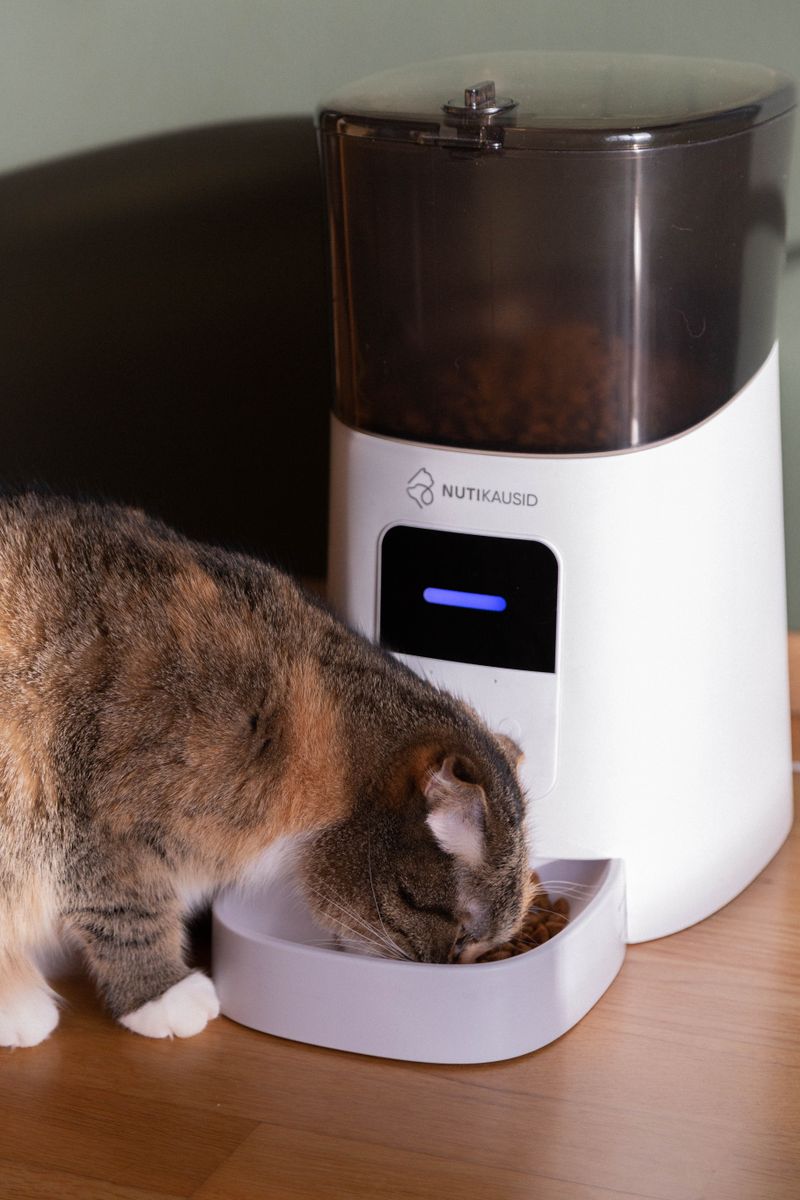
Overview
Automatic pet feeders are already half-robot — they have a hopper, a dispensing mechanism, and a timer. Rip out the timer board, wire in a servo and a camera, and you've got a smart feeder that dispenses treats on demand from your phone, detects your pet with computer vision, or runs on motion-triggered schedules.
This is a great first Pi project. You'll learn GPIO servo control, basic camera streaming, and REST API design — and your pet will love you for it.
What You Bring
The kit includes the servo, camera, and control electronics. You supply:
- Automatic pet feeder — any gravity or rotating-drum style (PetSafe, Arf Pets, or similar)
- Raspberry Pi 3B+ / 4 / Zero 2 W — the brain that replaces the stock timer
- microSD card — 8GB minimum, 16GB recommended
- USB power supply — 5V/3A for the Pi
- Pet food or treats — for testing and calibration (your pet will volunteer as quality inspector)
- Pi Camera Module or USB webcam — for live feed and motion capture
What's Included in the BYOB Kit
- MG996R servo with dispensing arm adapter
- PIR motion sensor for pet detection
- Servo driver board (PCA9685)
- Mounting hardware and brackets (3D-printed)
- Pre-crimped wiring harness with labeled connectors
- Complete source code, wiring diagrams, and setup documentation
What You Bring
The Full Send Kit includes all electronics and hardware. You supply:
- Automatic pet feeder — any gravity or rotating-drum style (PetSafe, Arf Pets, or similar)
- Pet food or treats — for testing and calibration (your pet will volunteer as quality inspector)
What's Included in the Full Send Kit
- Raspberry Pi Zero 2 W — pre-loaded with kit software
- 16GB microSD card — pre-imaged with Raspberry Pi OS and kit software
- USB-C power supply (5V/3A)
- Pi Camera Module v2
- MG996R servo with dispensing arm adapter
- PIR motion sensor for pet detection
- Servo driver board (PCA9685)
- Mounting hardware and brackets (3D-printed)
- Pre-crimped wiring harness with labeled connectors
- Complete source code, wiring diagrams, and setup documentation
What You Bring
Smart pet feeder with camera, scheduling, and portion control. Plug in and set your schedule.
- Pet food or treats — for calibration (your pet will volunteer as quality inspector)
What's Included — Ready to Use
- Auto pet feeder with Pi, camera, servo, and scheduling software pre-installed
- Raspberry Pi Zero 2 W — pre-loaded with kit software
- 16GB microSD card — pre-imaged with Raspberry Pi OS and kit software
- USB-C power supply (5V/3A)
- Pi Camera Module v2
- MG996R servo with dispensing arm adapter
- PIR motion sensor for pet detection
- Servo driver board (PCA9685)
- Mounting hardware and brackets (3D-printed)
- Pre-crimped wiring harness with labeled connectors
- Complete source code, wiring diagrams, and setup documentation
Every Zero Shot unit is hand-assembled, firmware-loaded, sensor-calibrated, and QA tested before shipping. Premium boxed packaging included.
The Build
You're replacing the feeder's timer mechanism with a servo-driven dispenser controlled by a Raspberry Pi. Add a camera for live streaming and motion detection, and you've got a feeder that knows when your pet is nearby and can dispense on command.
Disassemble the Feeder
Remove the timer board and dispensing motor from the feeder. Keep the hopper, chute, and bowl — you only need to replace the brains and the dispensing mechanism. Most feeders use a simple DC motor to rotate a paddle or drum; you're swapping that for a servo with more precise control.
Mount the Servo
Attach the MG996R servo where the original motor lived. The kit includes a dispensing arm adapter that connects the servo horn to the feeder's paddle mechanism. Calibrate the servo range — you want a clean 90-degree sweep that dispenses one portion per activation.
Test manually first: power the servo and sweep it by hand to verify it moves the paddle smoothly without jamming. Adjust the arm length if portions are too large or too small.
Camera and Motion Sensor
Mount the Pi Camera above the food bowl, angled down to capture the feeding area. Position the PIR motion sensor at pet height, aimed at the approach path. The camera streams live video; the PIR triggers recording and optional auto-dispense.
# Servo control
from gpiozero import Servo
servo = Servo(17)
servo.min()   # Close dispenser
servo.max()   # Open — dispense one portion
# ... full implementation in project files
Web Interface
The project files include a Flask web app with live camera feed, manual dispense button, feeding schedule editor, and a feeding log. Access it from any device on your network. The API endpoints let you integrate with Home Assistant, IFTTT, or custom scripts.
Calibrate and Deploy
Run a calibration routine: dispense 10 portions and weigh the total. Adjust the servo sweep angle until each portion is consistent. Set up your feeding schedule, enable motion-triggered treats if desired, and let your pet discover its new favorite machine.
Project Files — Included with BYOB Kit
Complete source code, wiring diagrams, and documentation. Enter your kit code to unlock.
Don't have a code? Get the kit — code included in every box.