Overview
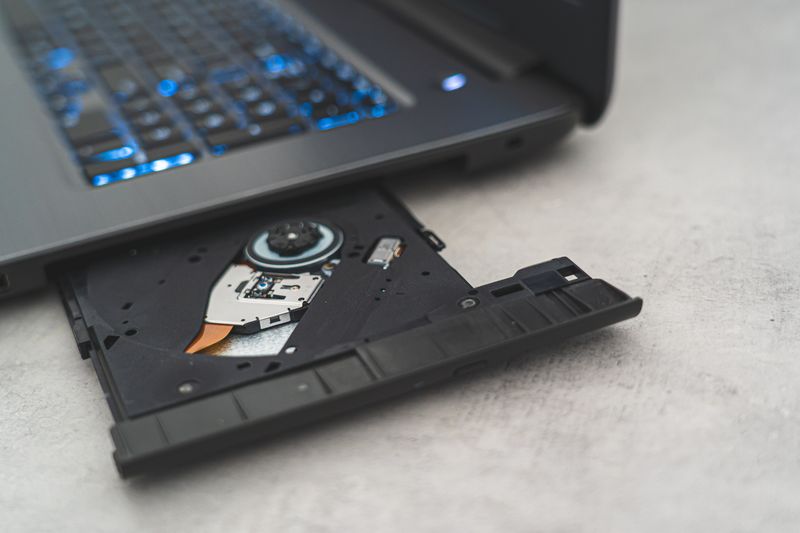
Two dead DVD drives give you precision X and Y linear axes for free. The stepper motors and lead screws inside each drive provide sub-millimeter positioning over a 40mm travel range. Mount a pen or low-power laser diode and you've got a miniature plotter, engraver, or drawing machine that fits on a desk and costs almost nothing.
This build teaches CNC fundamentals — stepper motor control, G-code parsing, and coordinate systems — on a safe, tiny scale before you graduate to full-size machines.
What You Bring
The kit includes the controller and pen lift mechanism. You supply:
- Two DVD/CD drives — any brand, dead is fine (you only need the sled mechanism)
- Screwdriver set — for disassembling the drives
- Fine-tip pen or marker — for the drawing head (Sharpie fine point recommended)
- Computer with USB port — for sending G-code to the plotter
- Arduino Nano — for running GRBL CNC firmware
What's Included in the BYOB Kit
- CNC shield with GRBL pre-flashed
- Two A4988 stepper motor drivers
- Pen lift servo (SG90 micro servo)
- Mounting frame and axis brackets (3D-printed)
- Pen holder with spring tension adjustment
- Complete source code, wiring diagrams, and setup documentation
What You Bring
The Full Send Kit includes all electronics and hardware. You supply:
- Two DVD/CD drives — any brand, dead is fine (you only need the sled mechanism)
- Screwdriver set — for disassembling the drives
- Fine-tip pen or marker — for the drawing head (Sharpie fine point recommended)
- Computer with USB port — for sending G-code to the plotter
What's Included in the Full Send Kit
- Arduino Nano — GRBL firmware pre-flashed
- CNC shield with GRBL pre-flashed
- Two A4988 stepper motor drivers
- Pen lift servo (SG90 micro servo)
- Mounting frame and axis brackets (3D-printed)
- Pen holder with spring tension adjustment
- Complete source code, wiring diagrams, and setup documentation
What You Bring
Plug in USB, send an SVG, watch it draw. No assembly, no calibration.
- Computer with USB port — for sending G-code to the plotter
- Fine-tip pen or marker — Sharpie fine point included, bring extras
What's Included — Ready to Use
- Fully assembled mini CNC plotter from salvaged DVD drives
- Arduino Nano — GRBL firmware pre-flashed
- CNC shield with GRBL pre-flashed
- Two A4988 stepper motor drivers
- Pen lift servo (SG90 micro servo)
- Mounting frame and axis brackets (3D-printed)
- Pen holder with spring tension adjustment
- Complete source code, wiring diagrams, and setup documentation
Every Zero Shot unit is hand-assembled, firmware-loaded, sensor-calibrated, and QA tested before shipping. Premium boxed packaging included.
The Build
Harvest the linear sled mechanism from two DVD drives, mount them perpendicular to each other, add a pen lift servo, and control the whole thing with GRBL — the same firmware that runs professional CNC routers.
Harvest the Sleds
Open each DVD drive and remove the laser sled assembly. You want the stepper motor, lead screw, and linear rail — they come out as a unit. Desolder or cut the flex cable. Clean off any grease and verify the sled slides smoothly by turning the lead screw by hand.
Test each stepper motor: connect to a driver and step it back and forth. The sled should move with zero backlash. If it's sloppy, the lead screw nut is worn — try another drive.
Build the Frame
Mount one sled horizontally (X-axis) on the base frame. Mount the second sled vertically on the X-axis carriage (Y-axis). The pen holder mounts on the Y-axis carriage. The result is a tiny XY gantry with about 40mm of travel in each direction — enough to draw on a sticky note or engrave a small tag.
Wire the Electronics
Connect each stepper motor to an A4988 driver on the CNC shield. Connect the pen lift servo to the spindle enable pin (repurposed for servo control in the firmware). Plug the CNC shield onto the Arduino Nano and connect via USB.
// GRBL is pre-flashed — send G-code directly
// Example: draw a 20mm square
G0 X0 Y0       ; Home
M3 S90          ; Pen down
G1 X20 F500     ; Draw right
G1 Y20          ; Draw up
G1 X0           ; Draw left
G1 Y0           ; Draw down
M5              ; Pen up
Calibrate Steps Per Millimeter
DVD drive lead screws have a known pitch, but manufacturing varies. Command a 10mm move, measure the actual distance with calipers, and adjust the steps-per-mm setting in GRBL. Repeat until movements are accurate to 0.1mm. The project files include a calibration pattern that makes this easy.
Generate and Plot
Convert images to G-code using Inkscape (with the GCodeTools plugin) or the included Python converter. Send G-code to the plotter via Universal G-Code Sender or the included serial script. Start with simple line art — text, geometric patterns, small logos. Graduate to raster engraving with a laser diode if you want to cut or burn.
Project Files — Included with BYOB Kit
Complete source code, wiring diagrams, and documentation. Enter your kit code to unlock.
Don't have a code? Get the kit — code included in every box.