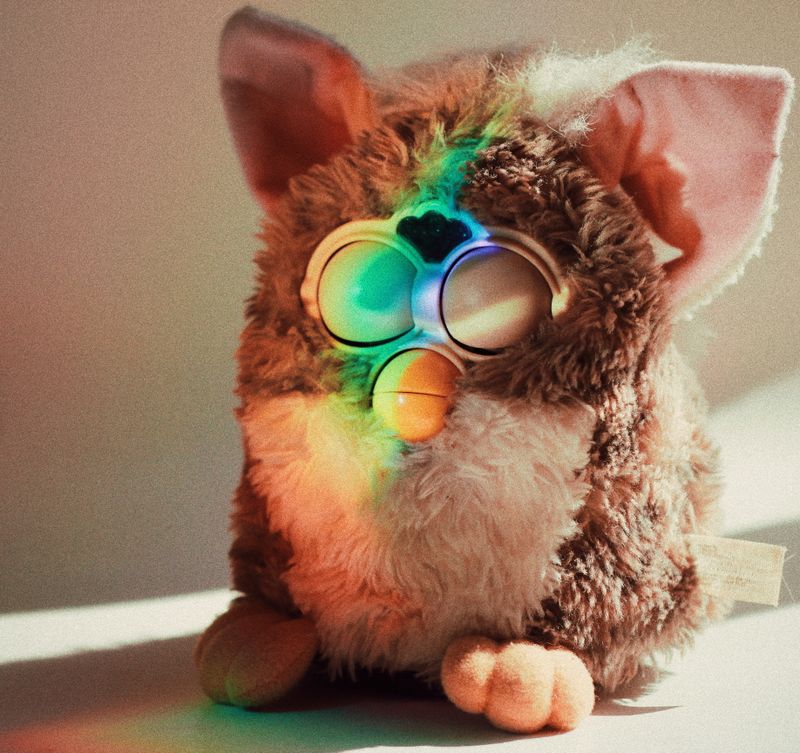
Overview
Gut a Furby — any generation from the OG 1998 model to the 2012 reboot — keep the fur skin and eyes, and replace the internals with a Raspberry Pi Zero 2 W, microphone, speaker, and optional eye servo. Connect it to an LLM API (OpenAI, Anthropic, or local Ollama) for conversational AI. The result: a haunted-looking plush toy that actually talks to you with real intelligence.
This is cursed nostalgia meets modern AI. The Furby shell provides an immediately recognizable, slightly unsettling form factor that people can't resist interacting with. When it responds with actual coherent conversation — or chaotic Furbish-infused madness — the effect is pure viral content gold.
What You Bring
The kit includes all internal electronics, mounting hardware, and wiring. You supply:
- Furby — any generation (1998 OG, 2005, or 2012 — eBay, thrift stores, your attic)
- Raspberry Pi Zero 2 W — the brain (must be Zero 2 W for WiFi and processing power)
- microSD card — 8GB minimum, 16GB recommended
- USB-C power bank — 5000mAh+ for portable use, or a USB-C wall adapter for stationary display
- OpenAI or Anthropic API key — for cloud LLM (or install Ollama for free local inference, slower on Pi Zero)
What's Included in the BYOB Kit
- Raspberry Pi Zero 2 W adapter board (pre-soldered GPIO headers)
- MAX98357A I2S DAC breakout board
- Electret microphone capsule + MAX9814 amplifier board
- Micro servo (9g) + eye mechanism adapter bracket
- 28mm 8-ohm speaker
- USB-C power distribution board with voltage regulation
- Internal mounting frame (3D-printed, fits all Furby generations)
- Pre-crimped wiring harness with labeled connectors
- Complete source code, wiring diagrams, and setup documentation
What You Bring
The Full Send Kit includes all electronics and hardware. You supply:
- Furby — any generation (1998 OG, 2005, or 2012 — eBay, thrift stores, your attic)
- OpenAI or Anthropic API key — for cloud LLM (or install Ollama for free local inference, slower on Pi Zero)
What's Included in the Full Send Kit
- Raspberry Pi Zero 2 W — pre-loaded with kit software
- 16GB microSD card — pre-imaged with Raspberry Pi OS and kit software
- USB-C power bank (5000mAh)
- Raspberry Pi Zero 2 W adapter board (pre-soldered GPIO headers)
- MAX98357A I2S DAC breakout board
- Electret microphone capsule + MAX9814 amplifier board
- Micro servo (9g) + eye mechanism adapter bracket
- 28mm 8-ohm speaker
- USB-C power distribution board with voltage regulation
- Internal mounting frame (3D-printed, fits all Furby generations)
- Pre-crimped wiring harness with labeled connectors
- Complete source code, wiring diagrams, and setup documentation
What You Bring
An AI-powered Furby that actually talks back. Add your API key and start chatting.
- OpenAI or Anthropic API key — for cloud LLM (or use pre-installed Ollama for free local inference)
What's Included — Ready to Use
- Furby (thrift-sourced) fully converted with Pi, speaker, mic, and servo installed
- Raspberry Pi Zero 2 W — pre-loaded with kit software
- 16GB microSD card — pre-imaged with Raspberry Pi OS and kit software
- USB-C power bank (5000mAh)
- Raspberry Pi Zero 2 W adapter board (pre-soldered GPIO headers)
- MAX98357A I2S DAC breakout board
- Electret microphone capsule + MAX9814 amplifier board
- Micro servo (9g) + eye mechanism adapter bracket
- 28mm 8-ohm speaker
- USB-C power distribution board with voltage regulation
- Internal mounting frame (3D-printed, fits all Furby generations)
- Pre-crimped wiring harness with labeled connectors
- Complete source code, wiring diagrams, and setup documentation
Every Zero Shot unit is hand-assembled, firmware-loaded, sensor-calibrated, and QA tested before shipping. Premium boxed packaging included.
How It Works
The Pi Zero 2 W runs a Python script that continuously listens for voice activity. When it detects speech, it records the audio, sends it to Whisper API for transcription, passes the text to your chosen LLM, receives the response, converts it to speech via TTS (ElevenLabs or local Piper), and plays it through the internal speaker. Optional servo control adds eye blinks and movements while the Furby "thinks."
You program its personality through the system prompt — make it helpful, creepy, chaotic, or a mix. Include classic Furbish vocabulary ("doo-ay," "kah," "wee-tee") for authentic vintage vibes. The fur shell muffles the speaker just enough to sound like it's coming from inside a small creature, which is deeply unsettling in the best way.
Competition Categories
- AI Demo — Judges evaluate conversational quality, response time, and personality consistency. Show off your prompt engineering skills.
- Freestyle — Presentation, costume integration, and personality design. Points for creative Furbish integration and interaction design.
- Performance — Audience reaction metric. The more people who nervously laugh while backing away, the better your score.
Build Steps
Acquire and Disassemble the Furby
Source any generation Furby — check eBay, thrift stores, or your parents' attic. You need one that powers on and moves, but broken electronics are fine since you're replacing everything anyway.
Carefully remove the fur skin by locating the seam on the bottom and peeling it off. Most Furbys have the skin held on by elastic or light adhesive. Document the eye mechanism orientation with photos before removing anything. Remove the motor assembly, main circuit board, and original speaker. Keep the fur skin, eye mechanism, beak assembly, and plastic shell. The eye mechanism varies by generation — 1998 uses a simple cam system, while 2012 has a more complex LCD screen setup.
Raspberry Pi Zero 2 W Setup
Flash Raspberry Pi OS Lite to a microSD card and configure WiFi during setup. Boot the Pi and install required packages: Python 3.9+, PyAudio, requests library, and GPIO control libraries. If using local TTS (Piper), install it now. For cloud services, set up API keys for OpenAI/Anthropic and ElevenLabs.
Configure audio hardware: connect the MAX98357A I2S DAC to the Pi's GPIO pins (BCM 18, 19, 21 for I2S), attach the 28mm speaker to the DAC output, and wire the electret microphone to the MAX9814 amplifier board, then connect the amplifier output to the Pi's GPIO (BCM 23 for ADC input, or use USB audio adapter for simplicity).
# Install audio and GPIO libraries
sudo apt-get update && sudo apt-get install -y python3-pyaudio python3-rpi.gpio
# ... full implementation in project files
Mount Hardware Inside the Furby Shell
The kit includes a custom internal mounting frame that fits the Pi Zero 2 W, DAC board, amplifier, and power board inside the Furby's plastic body cavity. Position the speaker in the belly area where the original speaker lived. Route the microphone wire to the beak opening — drill a small hole if needed, or use existing wire channels from the original electronics.
Secure everything with hot glue or double-sided foam tape. Leave access to the microSD card slot and USB port for updates and power. Cable management is critical in the confined space — use the included wiring harness to keep connections organized and prevent shorts.
Eye Servo (Optional but Recommended)
Connect a micro servo to GPIO BCM 17. The kit includes an eye mechanism adapter bracket that connects the servo arm to the original Furby eye cam. This allows programmatic control of eye position — blink while "thinking," look around while speaking, or randomize for unsettling effect.
Test servo range before final installation. Furby eyes typically need 60-120 degrees of rotation. Use PWM control to achieve smooth movement rather than jerky steps.
import RPi.GPIO as GPIO
GPIO.setmode(GPIO.BCM)
GPIO.setup(17, GPIO.OUT)
servo = GPIO.PWM(17, 50)  # 50Hz
# ... full implementation in project files
Software — The Listen-Think-Speak Loop
The core script runs an infinite loop: detect voice activity, record audio chunk, send to Whisper for transcription, pass text to LLM API, receive response, convert to speech, play audio. Add eye servo triggers during "thinking" pauses for maximum effect.
while True:
    audio = listen_for_voice()
    text = whisper_transcribe(audio)
    response = llm_query(text, personality_prompt)
    # ... full implementation in project files
Use threading to handle servo animations during LLM API calls to reduce perceived latency. The project files include complete implementations for OpenAI, Anthropic, and local Ollama backends, plus ElevenLabs and Piper TTS integration.
Personality Programming
The system prompt defines your Furby's personality. Go creepy ("I have been waiting in the dark for so long..."), helpful ("Furby help! Kah!"), or chaotic ("Wee-tee want chaos! Doo-ay!"). Mix in authentic Furbish vocabulary from the original toy manual for nostalgic flavor.
SYSTEM_PROMPT = """
You are a Furby that has been given sentience. You speak in short sentences mixing English and Furbish.
Use words like: doo-ay (big), kah (mine), wee-tee (small), u-nye (uh-oh)...
# ... full implementation in project files
"""
Experiment with temperature settings — higher values (0.8-1.0) produce more chaotic, unpredictable responses. Lower values (0.3-0.5) keep it consistent and on-brand. The project files include several pre-built personality templates to start from.
Power Supply
Use a USB-C power bank mounted in the Furby's base for portable operation, or hardwire a USB cable through the bottom for stationary use. The Pi Zero 2 W plus audio hardware draws approximately 500-800mA under load. A 5000mAh power bank provides 4-6 hours of runtime.
The kit includes a USB-C power board with built-in voltage regulation and low-battery cutoff to protect your power bank. Route the cable cleanly through the base cavity and secure the battery with velcro straps for easy replacement.
Testing and Calibration
Test each component individually before final assembly: verify microphone pickup range (optimal is 1-2 feet), speaker volume and clarity, servo range of motion, and API connectivity. Run the full loop in open-bench configuration to debug timing and response quality.
Once everything works, reassemble the fur skin and test again — the fur muffles the speaker and may affect microphone sensitivity. Adjust gain settings as needed. The project files include a calibration script that helps tune audio levels and servo positions.
Tips for Success
- Start with cloud APIs — OpenAI and ElevenLabs are easier to set up than local alternatives. Optimize later once you've proven the concept.
- Test outside the shell first — debug audio, servo, and software on the bench before cramming everything into the Furby. Fur makes troubleshooting miserable.
- Voice activity detection matters — fine-tune the threshold to avoid false triggers from background noise but still catch quiet speech.
- Prompt engineering is half the project — a well-crafted system prompt makes the difference between "cool demo" and "genuinely unsettling AI creature."
- Record everything — test conversations make great social media content. The first time it responds with something unexpectedly coherent (or disturbing) is marketing gold.
Troubleshooting Common Issues
Microphone Not Picking Up Audio
Check MAX9814 gain setting (adjust onboard resistor or use 60dB default). Verify the mic is positioned near the beak opening and not blocked by fur. Test with arecord -l and arecord -d 5 test.wav to confirm input device.
Speaker Output Distorted or Quiet
Reduce volume in software before increasing DAC gain. Verify I2S connections (GPIO 18/19/21). Check speaker polarity and ensure 8-ohm impedance match. Fur muffles sound — this is normal and adds to the effect.
Servo Jittering or Not Moving
Ensure dedicated 5V power to servo (don't power from GPIO 3.3V). Add 100µF capacitor across servo power pins to smooth supply. Check PWM frequency is 50Hz and duty cycle range is appropriate for your servo model.
API Timeouts or Slow Response
Check WiFi signal strength — the Furby's metal frame can interfere. Add error handling for network failures. Consider caching common responses or using local Ollama for faster inference at the cost of quality.
Project Files — Included with BYOB Kit
Complete source code, wiring diagrams, and documentation. Enter your kit code to unlock.
Don't have a code? Get the kit — code included in every box.