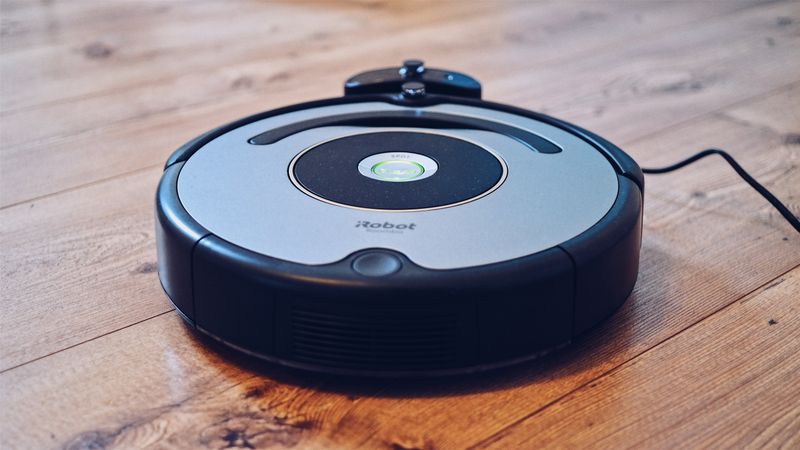
Why the Roomba?
The iRobot Roomba (500, 600, and 700 series) is arguably the most hackable consumer robot ever made. iRobot published the Open Interface (OI) specification — a serial protocol that gives you direct control of every motor, sensor, LED, and speaker on the robot. No reverse engineering required.
You're getting a $200+ robot platform for thrift-store prices: differential drive with encoders, cliff sensors, bump sensors, an IR receiver, a speaker, and a sturdy circular chassis that's perfect for sumo.
What You Bring
The kit includes all the bridge electronics, adapters, and sensors. You supply:
- iRobot Roomba — any 500, 600, or 700 series (thrift stores, eBay, doesn't need to vacuum, just drive)
- Raspberry Pi 3B+ / 4 / 5 — the brain that replaces the stock logic
- microSD card — 8GB minimum, 16GB recommended
- USB power supply — 5V/3A for the Pi (or power from Roomba's battery via included regulator)
What's Included in the BYOB Kit
- Roomba OI serial adapter board (pre-soldered)
- 5V voltage regulator (powers Pi from Roomba battery)
- Ultrasonic sensor array (3x HC-SR04) with mounting brackets
- IR proximity breakout board
- Pi mounting plate (3D-printed, fits inside dustbin cavity)
- Pre-crimped wiring harness with labeled connectors
- Complete source code, wiring diagrams, and setup documentation
What You Bring
The Full Send Kit includes all electronics and hardware. You supply:
- iRobot Roomba — any 500, 600, or 700 series (thrift stores, eBay, doesn't need to vacuum, just drive)
What's Included in the Full Send Kit
- Raspberry Pi 4B — pre-loaded with kit software
- 16GB microSD card — pre-imaged with Raspberry Pi OS and kit software
- USB-C power supply (5V/3A)
- Roomba OI serial adapter board (pre-soldered)
- 5V voltage regulator (powers Pi from Roomba battery)
- Ultrasonic sensor array (3x HC-SR04) with mounting brackets
- IR proximity breakout board
- Pi mounting plate (3D-printed, fits inside dustbin cavity)
- Pre-crimped wiring harness with labeled connectors
- Complete source code, wiring diagrams, and setup documentation
What You Bring
A competition-ready autonomous robot platform. Power it on and start coding challenges.
Nothing. It's ready to use.
What's Included — Ready to Use
- Refurbished Roomba 600 series with Pi mounted, firmware loaded, sensors calibrated
- Raspberry Pi 4B — pre-loaded with kit software
- 16GB microSD card — pre-imaged with Raspberry Pi OS and kit software
- USB-C power supply (5V/3A)
- Roomba OI serial adapter board (pre-soldered)
- 5V voltage regulator (powers Pi from Roomba battery)
- Ultrasonic sensor array (3x HC-SR04) with mounting brackets
- IR proximity breakout board
- Pi mounting plate (3D-printed, fits inside dustbin cavity)
- Pre-crimped wiring harness with labeled connectors
- Complete source code, wiring diagrams, and setup documentation
Every Zero Shot unit is hand-assembled, firmware-loaded, sensor-calibrated, and QA tested before shipping. Premium boxed packaging included.
Project Files — Included with BYOB Kit
Complete source code, wiring diagrams, and documentation. Enter your kit code to unlock.
Don't have a code? Get the kit — code included in every box.
Step-by-Step
Find Your Roomba
Hit up thrift stores, estate sales, or online marketplaces. You want a 500, 600, or 700 series — these all support the OI protocol. The 800+ series changed the connector and are harder to hack. Don't worry if the vacuum function is broken — you only need the drivetrain and sensors.
Access the Serial Port
Pop the top plate off your Roomba. You'll find a Mini-DIN 7-pin connector on the top — this is the cargo bay / serial port. The pinout:
Pin 1: Vpwr (unregulated battery, ~14V)
Pin 2: Vpwr (same)
Pin 3: RXD (Roomba receives, 0-5V)
// ... full implementation in project files
Connect RXD/TXD to your Arduino's TX/RX (or through a level shifter to a Pi). Ground to ground. That's it — you're wired.
Wake It Up & Take Control
The OI protocol starts with three commands:
Serial.write(128);  // START — initialize OI
Serial.write(131);  // SAFE mode — you drive, but cliff/wheel-drop still protected
// or
Serial.write(132);  // FULL mode — total control, no safety nets
Drive It
The Drive command (opcode 137) takes a velocity and a radius:
// Drive straight at 200 mm/s
byte cmd[] = {137, 0x00, 0xC8, 0x80, 0x00};
Serial.write(cmd, 5);
// ... full implementation in project files
Velocity range: -500 to 500 mm/s. Radius: -2000 to 2000 mm (special values: 32768 = straight, -1 = spin CW, 1 = spin CCW).
Read Sensors
Request sensor data with opcode 142 followed by a packet ID:
Serial.write(142);
Serial.write(7);    // Packet 7: bump & wheel drops
// Read 1 byte back — bit 0: right bumper, bit 1: left bumper
Key sensor packets: bumps (7), cliff sensors (9–12), wall sensor (8), distance traveled (19), angle turned (20). The full list is in iRobot's OI Spec document — free PDF download.
Build Autonomous Behaviors
Now the fun starts. Combine sensor reads with drive commands to create behaviors:
- Wall follower: Use the wall sensor + right bump to hug walls around a course
- Sumo logic: Drive forward until bump, then push. Use cliff sensors to detect the ring edge and back away
- Obstacle avoidance: Add an HC-SR04 ultrasonic sensor for forward detection beyond the bump range
- Line follower: The cliff sensors are IR reflectance sensors — they can detect tape lines on a contrasting surface
Armor Up (Optional)
For sumo or combat categories, add a low-profile wedge from sheet aluminum or 3D-printed PLA. The Roomba's round shape is already decent for deflection. Mount it with standoffs to the existing screw holes on the bumper.
Competition Ready?
A hacked Roomba can legitimately compete in multiple Clanker Corral categories:
- Sumo: The low center of gravity and strong drive motors make it a natural pusher. Add a wedge and it's competitive.
- Navigation: With cliff + bump + wall sensors built in, it can run obstacle courses out of the box. Add ultrasonic or IR distance sensors to level up.
- Freestyle: The novelty factor of a weaponized vacuum cleaner is worth serious showmanship points.
Resources
- iRobot Create 3 — iRobot's official education robot (same platform, purpose-built for hacking)
- GitHub: Roomba projects — Libraries for Arduino, Python, ROS, and more
- Search "iRobot Open Interface Specification PDF" for the full protocol reference